
Admin console for a WordPress site portfolio
One interface to assign sites and tools across a team, notify in real time, and open a WordPress session without ever sharing a password.
Role · Design, WordPress back end and Next.js front end (solo)
0
passwords ever handed to a contributor
6 resource types managed from a single screen
resource types managed from a single screen
4 sources folded into one search
sources folded into one search
- Client
- Internal project
- Period
- September - December 2025
- Duration
- 4 months
- Deliverables
- Admin console: accounts, sites, categories and tools in one place
- Walled contributor space - each person sees only what was assigned to them
- Delegated WordPress session opening, with no credential handed over
- Real-time notifications on every access granted or revoked
- Global search covering accounts, sites, categories and tools
The problem
An agency maintaining several dozen WordPress sites hits the same wall: every site has its own credentials, every licensed tool its own key, and all of it travels by chat and email. Access is shared between contributors without anyone knowing precisely who holds what. When someone joins or leaves, the passwords stay in circulation, and nothing records which sites they worked on.
This application answers that with a single console. An administrator declares sites, categories and tools, then assigns each contributor exactly what they need. Contributors see only what was assigned to them, and open a session on a site without ever receiving its password.
The structural choice is decoupling: WordPress stays the source of truth - it is already the working tool, and a dedicated plugin exposes assignments, notifications and search. The Next.js application holds no database of its own; it is a presentation head and an orchestration layer over the REST API.
Ten modules, ten problems solved
| Module | What it solves |
|---|---|
| Accounts and roles | Open, change or close an access from a single screen; closing an account strips every assignment attached to it at once. |
| Sites | The portfolio described once and for all - address, category, credentials - then filtered: each person sees only their own. |
| Categories | A classification that survives deletion: sites in a removed category fall back to an uncategorised state instead of vanishing. |
| Tools and licences | Licence keys and shared accounts stop travelling by chat: they are assigned exactly like a site. |
| Assignments | Grant or revoke an access in two gestures, with no duplicate possible: the selection is compared against what exists before any write. |
| Session opening | A single-use link opens the site's dashboard without any password changing hands. |
| Notifications | Every access granted, revoked or used surfaces in real time: activity across the portfolio stops being invisible. |
| Global search | One panel queries accounts, sites, categories and tools - no need to know which screen to look in. |
| Presence | A heartbeat every thirty seconds shows who is working, without anyone having to declare it. |
| Dashboard | Portfolio counters stay visible throughout navigation, including whatever is still assigned to nobody. |
The screens, on demonstration data
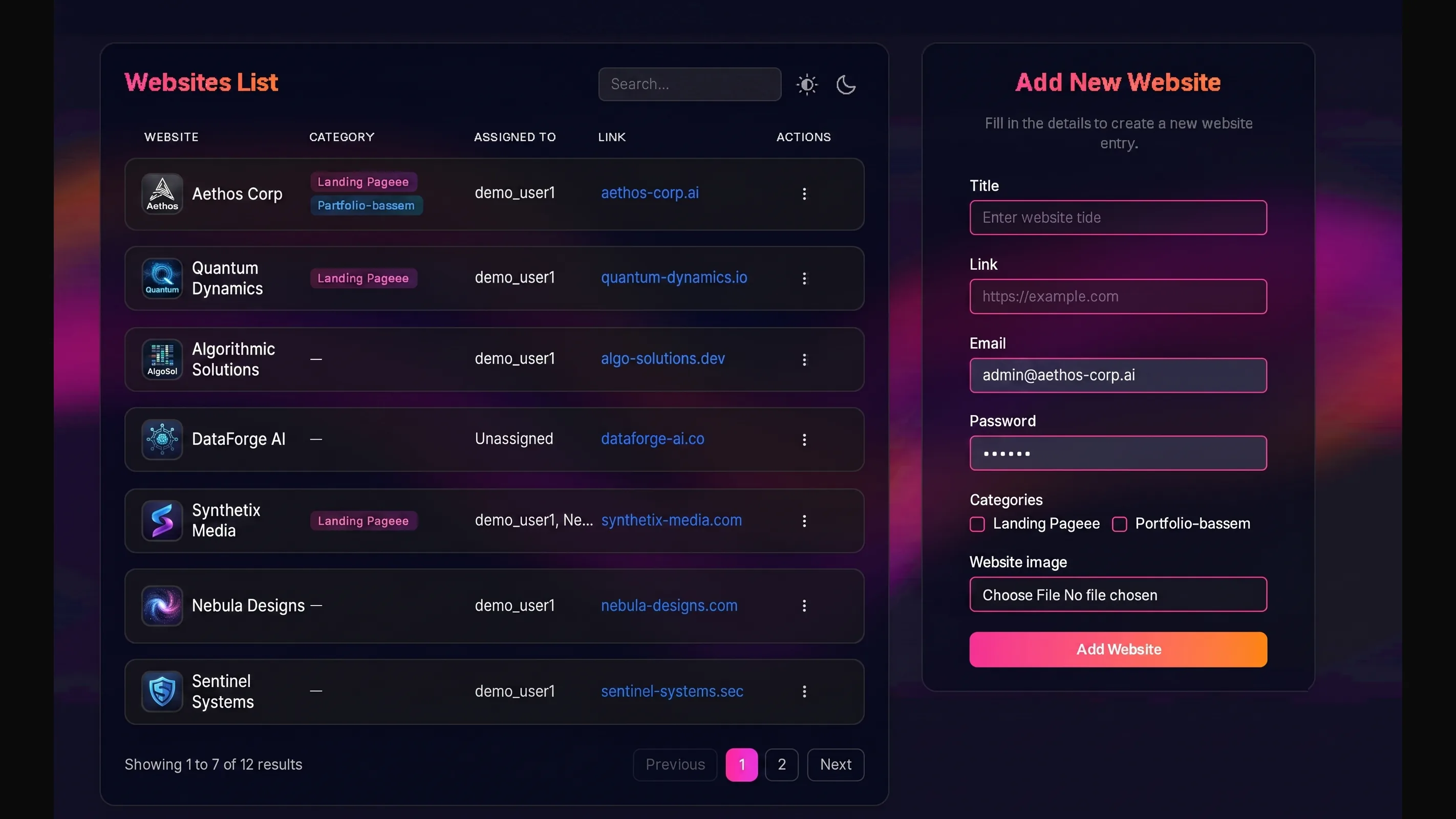
Every account carries its role and the sites entrusted to it. Closing the account takes the assignments with it. Licences and shared accounts are administered like sites, instead of travelling by chat. Deleting a category does not delete its sites: they fall back to uncategorised.
The assignment path, end to end
The administrator assigns
From the sites or tools table, they select one or more contributors. The request first compares the selection against existing assignments and writes only the difference.
The assignment is written to WordPress
The business plugin records the contributor-to-resource link and returns its identifier. The human-readable label of the resource is fetched straight after, falling back to a technical identifier if that call fails.
The notification takes two paths
It is first persisted in WordPress, which makes it available on the next page load, then pushed to the private channel of the contributor concerned. A delivery failure never cancels the assignment.
The contributor opens the site
From their list, they request a session. The application negotiates a single-use link with the target site - its token expires after five minutes - and alerts administrators of the access, with no password ever passing through the interface.
Architecture decisions
The starting template mandated a dedicated database, with its object-relational mapping layer and migrations. Yet the sites, users and categories already lived in WordPress.
- Options considered
- Copy the data into a database of our own and keep it in sync, or treat WordPress as the single source of truth and write nothing locally.
- Decision
- Single source of truth in WordPress. The template's persistence layer was removed outright: no object-relational mapping dependency, no schema, no migrations.
- Why
- Two copies of the same record means permanent synchronisation work and a whole class of drift bugs. The entities already live in WordPress, where teams administer them anyway. The displaced cost is real and accepted: every screen depends on remote API latency, which client-side caching absorbs.
An assignment has to surface on the contributor's screen without a reload, but the infrastructure had no socket server.
- Options considered
- Poll the server on a fixed interval, run a socket server, or lean on a managed delivery service.
- Decision
- Managed delivery service, with one private channel per user. Interval polling is explicitly disabled; only a refresh on tab refocus remains.
- Why
- Polling burns requests continuously for a rare event, and a socket server would have been one more thing to operate for a single feature. The fallback is explicit: if the subscription does not land within four seconds, the cache is invalidated and the data refetched - the feature degrades rather than stalls.
Marking a notification read, or deleting one, means a round trip to WordPress. The wait was noticeable on repetitive gestures.
- Options considered
- Wait for server confirmation before repainting, or apply the change immediately and correct on failure.
- Decision
- Optimistic updates across all four list mutations, capturing prior state, restoring it on error and reconciling every time.
- Why
- For low-stakes, high-success gestures, the wait costs more than the occasional rollback. The catch is discipline: without restoring the captured state, a failure would leave the interface persistently wrong.
The presence indicator needed state shared across requests, with no external store provisioned.
- Options considered
- Add a distributed in-memory key-value store, a dedicated table, or accept a per-process registry.
- Decision
- Per-process in-memory registry, swept every five minutes, with the limitation documented in the file itself.
- Why
- Presence is a convenience signal whose loss carries no consequence: at worst a contributor shows offline until their next heartbeat, thirty seconds later. Provisioning infrastructure for that would have been out of proportion. The limitation is real and acknowledged - the state does not survive a restart and is not shared across instances.
Known limitations
The current state is a functionally delivered project, not a hardened one. Three items remain open and identified: access control is arbitrated in the browser, with no equivalent guard on the server routes; managed-site credentials travel in clear to the client instead of staying server-side; and secrets were hard-coded during the debugging phase, which forces a rotation before any publication. Naming them is part of the same work as having written them.
The visual identity is part of the work
The tool was not only built: it was named, drawn and animated. The logo starts from a stylised fennec - an animal picked for what it suggests of alertness and speed, two qualities you want from an access system - with the organisation's initial legible inside it. Continuity with the parent identity, without being a copy of it.
The palette holds to two warm tones on a dark ground, and the type is a geometric sans in capitals: readable on screen, restrained, and content to let the logo carry the personality. The dark ground is not a fashion choice - it is a legibility decision for an interface that stays open all day.
The brand animation
Stack
- Next.js 15
- React 19
- TypeScript
- NextAuth
- TanStack Query
- Pusher
- Tailwind CSS 4
- Radix UI
- Zod
- WordPress REST
- PHP
- JWT
What changes, in three numbers
0
passwords ever handed to a contributor
How it was measured · The session opens through a single-use link requested from the target site on click.
6 resource types managed from a single screen
resource types managed from a single screen
How it was measured · Accounts, sites, categories, tools, assignments and notifications, each with its own screens.
4 sources folded into one search
sources folded into one search
How it was measured · A single panel queries accounts, sites, categories and tools at once.